Designing for security
Outer Loop does multiple unconventional things:
- It combines a browser (which inherently runs untrusted code) with access to SSH or localhost, which raises the stakes of what goes wrong if the browser is compromised.
- It allows untrusted machine code to run on your Mac, in a sandbox.
- It embraces “sudo” so it can connect to root services, to give parity with using a terminal.
- It encourages a world where servers run apps as little local HTTP servers, sometimes as root.
These are intentional decisions that bring sufficient user benefit to be worth it. But shipping something like this requires a lot of attention to security. This means two things: (1.) building stuff correctly, and (2.) building in safeguards for if there ever is an exploit.
First, getting the design right is really just making a long series of decisions and not screwing up. Here’s are some intentional decisions:
- Push towards using Unix domain sockets, instead of ports, so accesses require running as the appropriate user.
- Build in “sudo” awareness, so admin tools can require you to elevate to root before you can connect to their socket. Without this, Outer Loop would have nudged people toward running HTTP servers as root and allowing users to connect to them, creating huge elevation-of-privilege risks.
- All of the outerframe sandbox choices.
- Implementing SSH at the proxy level, not at the port-forwarding level, so we don’t expose your private endpoints to other users and processes on your machine.
Second, the rest of this page discusses safeguards.
Defense-in-depth
Outer Loop runs multiple instances of itself, to isolate servers from each other, and to isolate servers and localhost from the public internet. This actually leads to a fun design, where the Mac dock accumulates multiple Outer Loop instances with helpful icons:
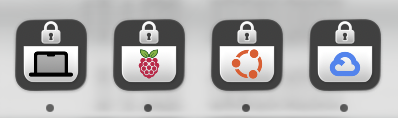
When you connect to a server, Outer Loop locks itself down so that it can only connect to that server. If you want to open a new server or the public internet, Outer Loop launches a new instance. This design is rooted in security, and being able to do this icon trick was a happy accident.
So how did I arrive at this design? Let’s talk about defense in depth. (The rest of this section is written from the perspective of Marcus Lewis.)
The term “defense in depth” refers to building layered safeguards. It involves asking, “Suppose an attacker gets past this line of defense. What then?” One thing to note about defense-in-depth is that it’s not strictly necessary. It is acceptable to instead decide, “We’re going to harden this interface, and there will never be a single security exploit.” And, yes, you probably should harden the interface and aspire to zero exploits. But even if you succeed at that, users and IT departments also need to trust you to succeed at that. Defense in depth is good both as an actual safeguard, and as a reassurance to your target market. (An interesting implication here is: if you are 100% capable of building a secure interface, and if people trust you to do it, then you can skip defense-in-depth, which means the market will let you build smoother user experiences than you otherwise could.)
So it’s often worth wearing and alternating between two hats. Hat #1 is: you’re building an interface that can’t be hacked. But also, you’ll wear a second hat, Hat #2, asking, “And if I am hacked, here’s how we’ll minimize damages.”
From a defense-in-depth perspective, merging any app with a browser is risky. A browser’s job is to run untrusted code. There are essentially two different “sandboxes” involved. One is the operating system sandbox; you don’t want to let that untrusted code touch your files and settings. There is a second sandbox, though: the app itself. Consider what would happen if a webpage managed to compromise your conventional web browser’s top-level app process. Even if that process is sandboxed from accessing your files, that untrusted code would be able to do anything inside the app that the user can do; it could browse your history, navigate to websites that you’re logged into, etc. The browser app itself has its own set of capabilities, and blocking the untrusted content from those capabilities is essentially a second orthogonal sandbox. When we consider defense-in-depth, one question we ask is, “What happens if that second sandbox is escaped?” From a defense-in-depth perspective, if you combine a browser with some other app, you are making the situation worse. This may be worth it, because of how much benefit it provides to the user, but you arguably need to consider this angle and consider mitigations.
So, how do we mitigate the defense-in-depth issues of combining an SSH client with a browser?
One possible answer is: make it so the browser never has the ability to run arbitrary commands on the server. At first, this was my plan. But it quickly became apparent that many potential SSH browser apps can be used to run arbitrary commands. For example, one of the most compelling apps to use in an SSH browser is a profiler that generates flame graphs. Profilers typically can launch arbitrary processes and profile them. There’s nothing stopping a bad actor from running arbitrary commands under the guise of “profiling” them. The same is true of many other types of apps, like debuggers or scientific notebooks. Thus, even if the SSH browser itself can’t run commands, in practice, most servers will expose apps that do allow it, so a compromised browser can execute arbitrary commands by talking to these apps.
In balancing functionality with potential for misuse, I landed on the following design: I will accept the reality that a compromised process may be able to run commands on the server that compromised it, but I will not let it run commands on other servers. I’ll launch multiple instances of the app, one per server. So, the worst that can happen is the server pwns itself. Strictly speaking, that still is undesirable, as you can imagine scenarios where a server shows a visualization that came from a nefarious third party, and that visualization manages to compromise the Outer Loop process, which then compromises the server. But these stakes are much lower than one where talking to one evil server compromises all your other saved servers.
And of course, none of that will ever happen, because I will wear Hat #1 and keep it from ever happening. But that other guy wearing Hat #2 also is willing to sign off on this design.